NotJust Another Windows Build
Give AtomOS a try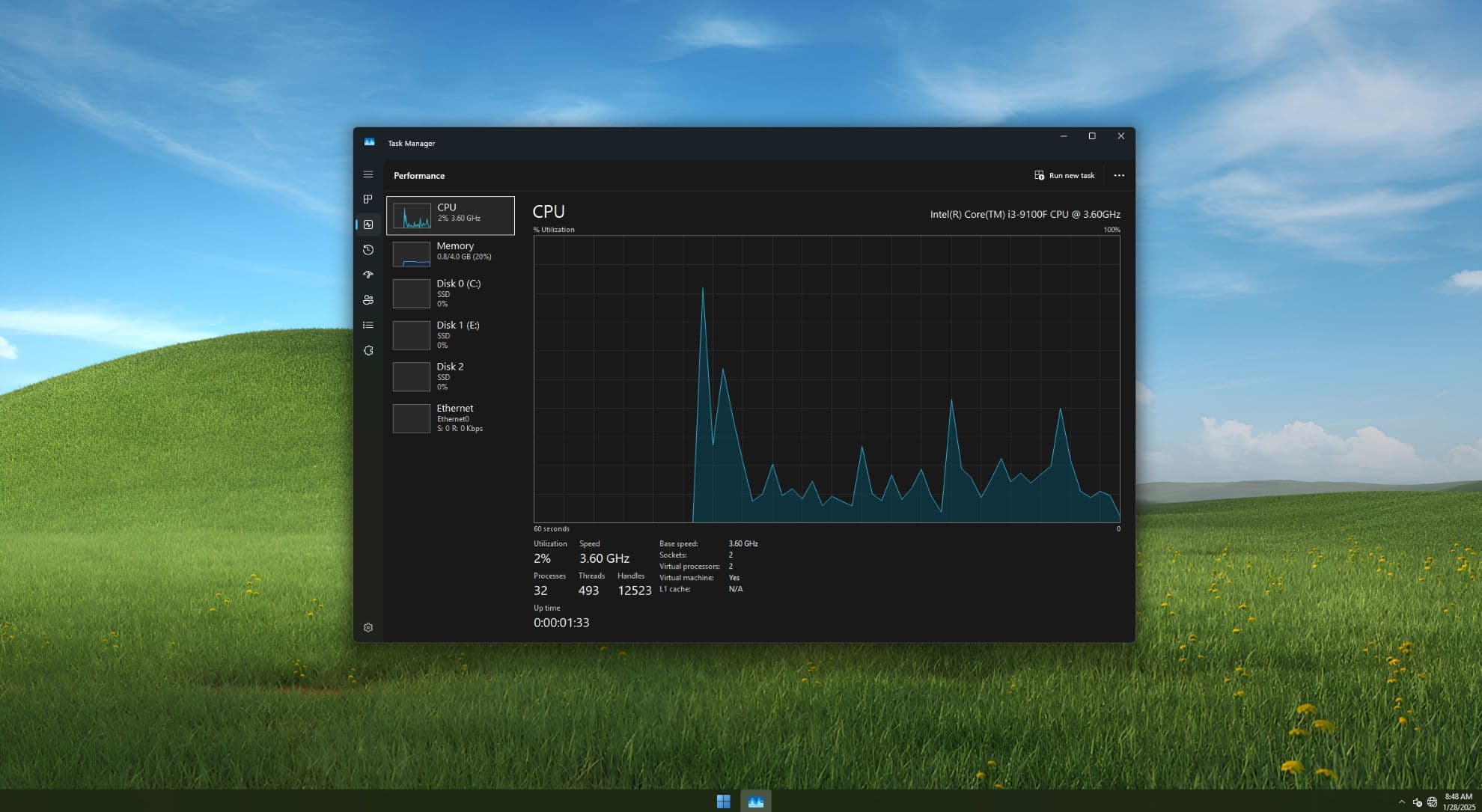
What Makes AtomOS Special?
Discover how our optimized Windows builds can transform your experience in every aspect, making it faster, safer, and smoother.
Lighter Than Light
Our builds use up to 7X less disk space than stock Windows, with ZERO pre-installed apps, offering a cleaner, faster system.
Enhanced Security
Say goodbye to Windows bloatware and telemetry. Enjoy a completely clean system for enhanced security and privacy.
Resource Efficient
Experience the lowest resource usage for your device, with CPU and RAM consumption 5X lower than stock Windows builds.
Cleaner Experience
Ever wondered what Windows without bloatware feels like? Try it, and see how smooth and fast your system can truly be!
Pre-Tweaked for You
Unlock your device’s full potential with hundreds of advanced tweaks pre-applied, ensuring optimal hardware performance.
Lifetime Support
As long as you are using AtomOS, you will enjoy lifetime support from our dedicated team, keeping your experience seamless and smooth.
Download Atom OS
Choose your AtomOS edition and start your journey.
Windows 10 Based
Maximum compatibility
Windows 11 Based
Modern experience
Select the edition that best suits your needs.
Click on the edition to view details.
Lite Edition
For Low-End devices
Standard Edition
For Mid-End devices
Ultimate Edition
For Utlimate users
Atom OS Lite
the best for low-end devices with the lowest num of installed apps and running services
System Requirements
- Processor: Intel/AMD processor 1 GHz
- Memory: 1 GB RAM
- Storage: 6 GB available space
- Graphics: DirectX 9 or later with WDDM 1.0 driver
Atom OS vs Standard Windows
See how our optimized OS compares to the standard Windows experience.
| Feature | Atom OS | Standard Windows |
|---|---|---|
| Boot Time | Fast (10-15s) | Slow (35-40s) |
| Memory Usage | Low (750MB-1GB) | High (2-4GB) |
| Disk Space Required | 6GB | 18GB+ |
| Background Processes | Minimal | Numerous |
| Bloatware | None | Significant |
| Updates | Optional | Forced |
| Privacy Settings | No Telemetry | Telemetry Enabled |
| Software Compatibility | Most Windows Apps | All Windows Apps |
| Overall Performance | Excellent | Average |
Experience the difference yourself. Atom OS delivers the Windows experience you need without the bloat you don't, resulting in a faster, more efficient system.
Try Atom OS TodayChoose Your Optimization Level
Select the plan that best fits your needs and take your system's performance to the next level.
Standard Optimization PACKAGE
- Optimizing Sessions with AnyDesk
- General Tweaks
- Windows Tweaks
- CPU Tweaks
- GPU Tweaks
- RAM Tweaks
- Network Tweaks
- Power Tweaks
- The Ultimate Subscription
- Session Duration: ~70 minutes
- And more to see!
Ultimate Optimization PACKAGE
- Optimizing Sessions with AnyDesk
- Windows Settings Tweaks
- Cpu, Ram, Gpu, Usb Tweaks
- Gpu Over Clocking
- Hidden Bios Tweaks
- Custom Windows build made specially for you with your files and tweaks
- The Ultimate Subscription
- Early access to all AtomOS Builds & Tweaks
- Session Duration: ~100 minutes
- And more to see!
Ultimate Subscription - Life-Time
- Discord Ultimate Role
- Access to all of the ultimate AtomOS Builds
- Access to all private AtomOS Builds
- Access to all private ultimate AtomOS Tweaks
- Life-Time access to the Atom Tool Box
- 30% discount on all Project Atom paid products
- Access to all OG and legacy builds
- And more to see!
What Our Users Say
Dont just take our word for it — hear from people who have transformed their computing experience with Atom OS.
Thanks to Osama for these amazing ISO builds! They’re incredibly smooth, especially for low-end users. Even with multiple apps open, the system runs with minimal processes. Whether it's gaming or general tasks, Osama has always been there to help. The Ultimate builds are truly outstanding.

Taha
Ultimate Discord User
On my limited budget as a student, I couldn't afford a new laptop. Atom OS made my old computer usable again for my studies. It runs all the software I need without lagging. Highly recommended!

Marrio
Discord User
I was skeptical at first, but Atom OS has significantly improved my workflow. My design applications run faster, and I don't experience those frustrating freezes anymore.
.png)
Mohamed Ali
Ultimate Discord User
Truly an amazing difference! Big thanks to Osama and the entire team. I’m really impressed and proud that something this great is coming from Egypt. Mashallah, the work is really well done and clean!
Yassin Garah
Discord User
Join Our Community
Connect with fellow Atom OS users, get support, and stay updated with the latest developments.
Active Community
Join hundreds of users sharing tips, tricks, and experiences with Atom OS.
Discord Server
Get instant support, chat with other users, and stay updated with announcements.
Open Source
All scripts and tools used in our projects are open source and community-reviewed.
Exclusive Benefits
Get access to special perks, early releases, and member-only content.
Frequently Asked Questions
Find answers to common questions about Atom OS and how it can benefit you.
Atom OS is a lightweight, optimized, and privacy-focused version of Windows. It is designed to reduce resource usage, improve performance, and remove unnecessary components while keeping core Windows functionality intact.
Yes. Atom OS is completely legal as long as you activate it with a genuine Windows license. Atom OS is not a cracked or pirated version of Windows; it still requires proper activation using a valid license key.
Download the Atom OS ISO, create a bootable USB using tools like Rufus, and follow the installation guide. The process is similar to installing standard Windows.
Yes, but a clean installation is usually required. Always back up your data before switching operating systems.
Use CRU (Custom Resolution Utility) to delete all resolutions except your desired refresh rate (for example, 165Hz). Save the changes, then restart your GPU driver to apply the new refresh rate.
Press Shift + F10, then type: oobe\bypassnro and press Enter. Your system will restart and allow you to continue setup without a network connection.
Go to Privacy & Security settings and manually enable microphone access for apps.
Open services.msc and locate WLAN AutoConfig. By default, it may be disabled. Set it to Automatic and start the service.
Yes. This is normal during installation. Right-click on the desktop, open Display Settings, and select your preferred resolution after installation.
Install LightShot and Atom Essentials to restore screenshot functionality.
Open Control Panel > System > Advanced system settings. Under Performance, click Settings, then go to the Advanced tab. Click Change under Virtual Memory, disable automatic management, select your system drive, choose System Managed Size or set a custom value, click Set, then restart your PC.
Install the StartAllBack application located on the Desktop. This usually resolves shell-related critical errors.
Use the following credentials: Username: User | Password: User
Still have questions? We're here to help.
Contact Support